Stop Letting AI Write Your Database Migrations
The Hidden Cost of Automated Convenience: Why Production-Grade Databases Demand Human Oversight.

The era of “just ask the LLM” has made us remarkably productive, but it has also made us dangerously comfortable. We are currently witnessing a shift where developers are offloading critical infrastructure decisions to generative models. While having an AI suggest a React component or a regex pattern is relatively low-stakes, letting it dictate your database schema transitions is playing with fire.
The problem isn’t that AI is “bad” at SQL; it’s that AI lacks context. It doesn’t know your traffic patterns, it doesn’t understand your locking mechanisms, and it certainly doesn’t care if your production environment goes dark at 3:00 AM because of a table lock that lasted ten minutes too long.
The Illusion of “It Works”
When you ask an AI to generate a migration — say, adding a non-nullable column with a default value to a table with five million rows — the code it gives you will likely be syntactically perfect. You run it in your local environment with fifty rows of seed data, and it finishes in milliseconds.
The issue arises when that same script hits a production environment.
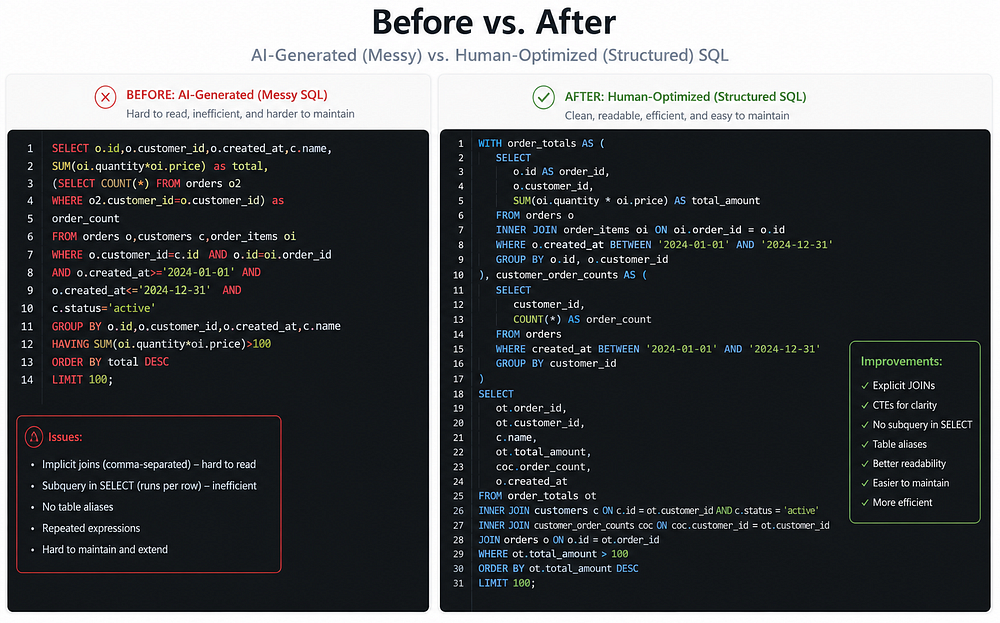
The Before (AI-Generated Standard):
--Generated by AI: Simple, clean, and potentially catastrophic
ALTER TABLE orders ADD COLUMN status_code VARCHAR(255) NOT NULL DEFAULT 'pending';
On a massive table, this operation can trigger a full table rewrite. In PostgreSQL, for instance, versions prior to 11 would lock the entire table while writing that default value to every single row. If your application is high-traffic, your API starts throwing 504 Gateway Timeouts because every connection is waiting for that lock to release.
The After (Human-Engineered Safe Migration):
-- Step 1: Add the column as nullable first (instant operation)
ALTER TABLE orders ADD COLUMN status_code VARCHAR(255);

-- Step 2: Set the default for future rows
ALTER TABLE orders ALTER COLUMN status_code SET DEFAULT 'pending';

-- Step 3: Update existing rows in small batches to avoid long-held locks
-- (This would typically be handled via a background job or scripted loop)

-- Step 4: Add the NOT NULL constraint after data is populated
ALTER TABLE orders ALTER COLUMN status_code SET NOT NULL;
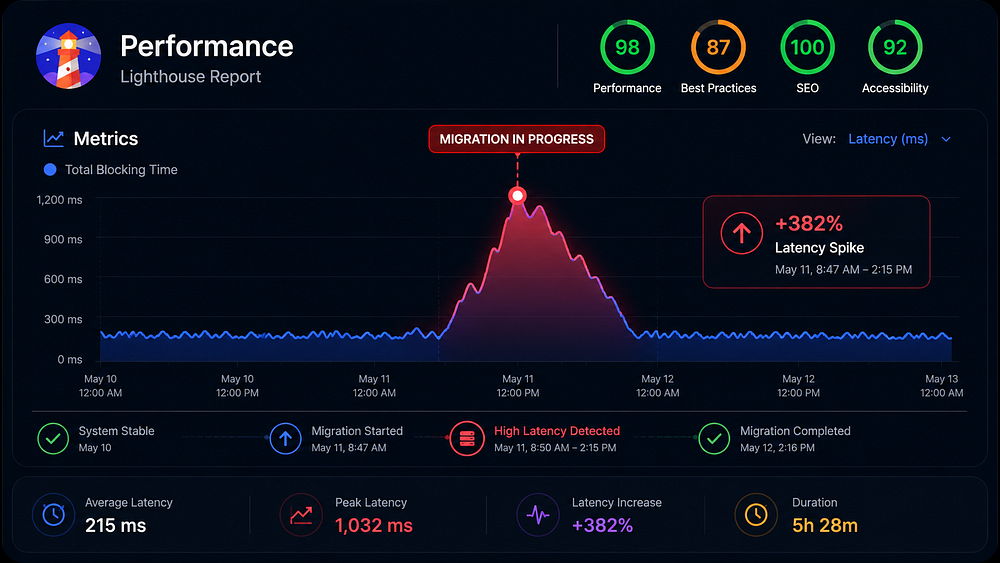
When “Convenience” Costs Millions
We don’t have to look far to see where automated or poorly planned migrations caused genuine wreckage. One of the most famous examples of migration-related downtime was the 2017 GitLab outage. While that was a human error during a manual intervention, it highlights the fragility of database state.
More recently, several tech startups have reported “silent” data corruption when AI-generated migrations suggested changing column types (like INT to BIGINT) without account for how the underlying ORM would handle the transition during a rolling deployment. If your AI-written migration drops a column before the new version of your application code is fully deployed across all nodes, your "After" state is a series of 500 errors.

The Context Gap
AI models operate on patterns, not performance profiles. They don’t know:
The Lock Hierarchy: Will this
ALTER TABLEblockSELECTqueries?Replication Lag: Will this massive update stall your read replicas?
Deployment Strategy: Is this a blue-green deployment or a rolling restart?
A migration is not just a script; it is a bridge between two states of a living system.
Moving Forward: Use AI as a Drafter, Not an Architect
I am not suggesting we go back to the Stone Age. AI is a phenomenal tool for boilerplate. If you need to scaffold a complex set of join tables, let the AI write the initial DDL.
But the moment that code touches a migration file, the “AI” portion of the task ends. You must take over as the engineer. You need to verify the locks, check the execution plan, and most importantly, simulate the migration against a production-sized data set.
If you’re interested in seeing how I’ve handled high-performance, SEO-optimized database architectures without relying on “magic” scripts, you can check out my project documentation on my GitHub or follow my updates on LinkedIn.
The database is the heart of your application. Don’t let a probabilistic model perform open-heart surgery on it.
You can find me across the web here:
✍️ Read more on Medium: @syedahmershah
💬 Join the discussion on Dev.to: @syedahmershah
🧠 Deep dives on Hashnode: @syedahmershah
💻 Check my code on GitHub: @ahmershahdev
🔗 Connect professionally on LinkedIn: Syed Ahmer Shah
🧭 All my links in one place on Beacons: Syed Ahmer Shah
🌐 Visit my Portfolio Website: ahmershah.dev
You can also find my verified Google Business profile here.